

The Google Workspace pricing 2026 landscape has fundamentally changed—and if you’re still budgeting based on 2024 assumptions, you’re already behind.
In early 2025, Google made a strategic shift: it bundled its AI assistant, Gemini, directly into Workspace plans. That move eliminated optional add-ons—but replaced them with a mandatory price increase of up to 22%.
So now, whether you use AI heavily or barely touch it, you’re paying for it.
In my experience working with SaaS cost optimization, this kind of pricing shift usually signals a long-term platform transformation—not a temporary bump. And that’s exactly what we’re seeing here.
Let’s break it all down so you can make the smartest decision for 2026.
What Changed in Google Workspace Pricing (2025–2026)? 📊
Google Workspace 2026 pricing reflects an AI-first model in which costs are embedded in base plans rather than optional add-ons. This means every user pays for AI features, regardless of usage, resulting in higher baseline pricing but broader access to automation tools.
Previously, businesses could opt into AI features separately. Now, that flexibility is gone.
Instead:
- AI is baked into every plan
- Prices increased across all tiers
- Value shifted from storage + email → AI + productivity
Therefore, the real question is no longer “Do you need Workspace?” but “Are you fully using what you’re paying for?”
Google Workspace Business Plans Comparison (2026)
For most companies (1–300 users), the Business tier is where decisions happen. Let’s compare them clearly.
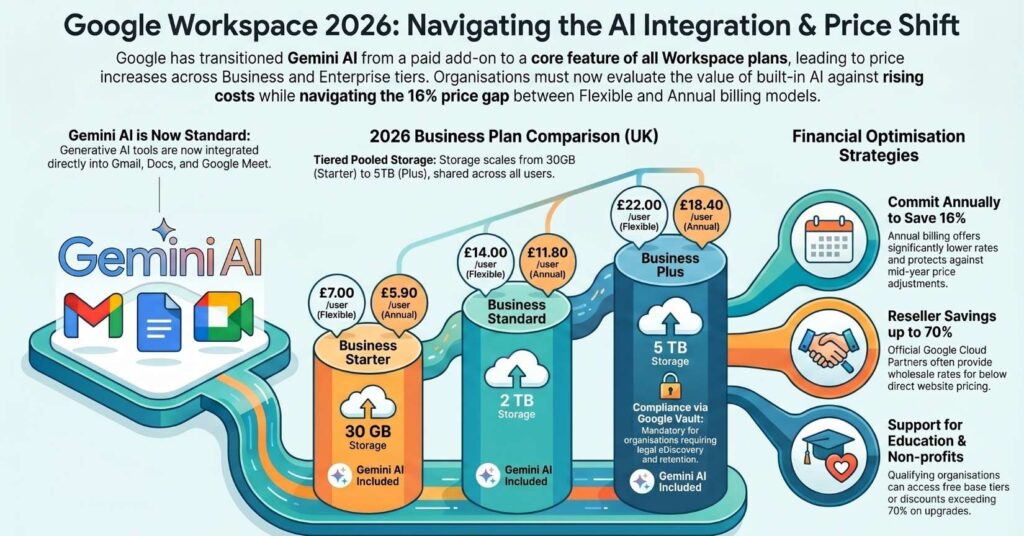
Google Workspace Edition Comparison and Pricing Guide 2025-2026
Google Workspace provides a suite of productivity tools tailored to different organizational needs, ranging from solo ventures to global enterprises. Effective 2025, many tiers now include Gemini AI features natively, streamlining workflows through integrated artificial intelligence.
| Edition | Monthly (Flex) | Annual (Per User) | Storage | Key Features |
| Business Starter | $8.40 USD | $7.00 USD | 30 GB | Custom email, 100-person meetings, standard security. |
| Business Standard | $16.80 USD | $14.00 USD | 2 TB | 150-person meetings, recordings, noise cancellation. |
| Business Plus | $26.40 USD | $22.00 USD | 5 TB | 500-person meetings, Google Vault, eDiscovery. |
| Enterprise | Custom | Custom | 5 TB+ | 1000-person meetings, DLP, Context-Aware Access. |
| Education Plus | $6.00 USD | $6.00 USD | 100 TB+ | Advanced teaching tools, transcription, 500-person meetings. |
| Nonprofits | Free | Free | 100 TB | Unlimited accounts, professional email, standard security. |
Key Edition Details
- Business Starter: Best for freelancers and small teams needing a professional domain and basic collaboration tools.
- Business Standard: Designed for growing teams that require significant cloud storage and enhanced video conferencing capabilities.
- Business Plus: Focuses on security-conscious organizations requiring advanced data retention and endpoint management.
- Enterprise Tiers: Targeted at large-scale corporations needing top-tier compliance, data loss prevention (DLP), and massive meeting capacities.
- Education & Nonprofits: Specialized versions offering high-capacity storage and discounted or free access for qualified institutions.
AI Integration
In 2025, Gemini AI is bundled into the base price for most Business and Enterprise editions. However, Education tiers typically require the Google AI Pro for Education add-on, priced at approximately $30.00 USD per user, per month.
Storage Management
Storage is generally pooled organization-wide, meaning the total capacity is shared across all users. Enterprise users can often request additional storage beyond the initial 5 TB per user allocation to meet high-data demands.
Business Starter: The Entry-Level Option 💼
Business Starter is designed for freelancers and small teams, offering basic collaboration tools, limited storage, and entry-level AI features at the lowest price point. It works best for low-data, communication-heavy workflows.
At first glance, it looks affordable.
But here’s the reality: 30 GB is extremely restrictive in 2026.
One team member working with videos or design files can consume that in days.
In my experience, most businesses outgrow this plan within 3–6 months.
Still, it works well if you:
- Primarily use email and documents
- Avoid large media files
- Need a professional domain email
Otherwise, expect friction.
Business Standard: The True “Sweet Spot” 🚀
Business Standard balances cost and capability by offering 2 TB pooled storage, meeting recordings, and advanced collaboration tools, making it ideal for growing teams with hybrid or remote workflows.
This is where Workspace starts to feel powerful.
The jump from 30 GB to 2 TB isn’t just an upgrade—it’s a transformation.
Now your team can:
- Record meetings for async work
- Store large files without constant cleanup
- Collaborate across departments without bottlenecks
Moreover, pooled storage means your heavy users won’t break the system.
When I tested this setup with a remote team, productivity improved simply because people stopped worrying about storage limits.
That’s the hidden ROI.
Business Plus: Built for Security and Compliance 🔐
Business Plus focuses on advanced security, compliance, and data governance, offering 5 TB of storage, audit tools, and legal archiving capabilities essential for regulated industries.
This plan isn’t about productivity—it’s about protection.
You’re paying for:
- Data retention (Google Vault)
- Legal compliance
- Advanced endpoint management
If you’re in finance, healthcare, or legal sectors, this isn’t optional.
It’s mandatory.
However, for most startups or SMBs, this tier is overkill.
Enterprise Plans: Custom at Scale 🏢
Enterprise plans offer unlimited users, advanced security controls, and custom pricing tailored to large organizations with complex infrastructure and compliance needs.
Once you cross 300 users, everything changes.
You get:
- Custom storage scaling
- Advanced DLP (Data Loss Prevention)
- Context-aware access controls
But pricing? That’s behind a sales call.
And yes—negotiation matters here more than features.
Flexible vs Annual Plans: Which Saves More? 💰
Flexible plans offer monthly billing with no commitment, while annual plans provide discounted pricing in exchange for long-term contracts and limited flexibility.
Here’s the truth most people miss:
Flexible plans cost more—but reduce risk.
Annual plans save money—but increase commitment.
So the decision depends on stability.
Choose Flexible if:
- Your team size changes frequently
- You hire seasonally
- You’re still scaling
Choose Annual if:
- Your team is stable
- You want predictable costs
- You’re optimizing margins
In most cases, established businesses should go annual.
Hidden Costs You Can’t Ignore ⚠️
Google Workspace includes core tools, but additional services like voice, advanced AI, and app integrations can increase total costs by 10–20%, making the real price significantly higher than advertised.
This is where budgets quietly break.
Here are the biggest add-ons:
- Google Voice (~$10/user/month)
- Advanced AI tiers (~$249/month)
- AppSheet upgrades (~$20/user/month)
And then there are system limits:
- 750 GB daily upload cap
- 500 million file limit per user
These aren’t dealbreakers—but they matter at scale.
The “All-or-Nothing” Pricing Trap
This is the one that frustrates most teams.
You usually can’t mix plans within the same domain.
So if leadership needs Business Plus, everyone might get upgraded.
That’s how costs spiral.
How to Save Up to 70% on Google Workspace 💡
You can significantly reduce Google Workspace costs by using resellers, choosing annual billing, and optimizing user licenses to eliminate unnecessary spending.
Let’s be practical.
1. Use Authorized Resellers
This is the biggest lever.
Resellers buy in bulk and pass savings down.
In some cases, I’ve seen:
- Starter plan drop from $8.40 → $2.95
That’s not a small discount—it’s a strategic advantage.
2. Switch to Annual Billing
You instantly save 16–20%.
Plus, you lock in pricing before future increases.
3. Audit Users Monthly
Unused accounts = wasted money.
Instead:
- Remove inactive users
- Use archived licenses for ex-employees
This alone can cut 10–15% of your bill.
Top Alternatives to Google Workspace in 2026
If pricing feels too high, you’re not stuck.
There are strong competitors.
Microsoft 365
Microsoft 365 is the closest competitor—and in some ways, more flexible.
It offers:
- Desktop apps (Word, Excel, PowerPoint)
- 1 TB storage per user
- Optional AI add-on
Unlike Google, AI isn’t forced into the price.
That matters.
Lark
Lark is a rising all-in-one platform.
It combines:
- Messaging
- Docs
- Meetings
- Project management
All in one place.
Its free plan alone beats many paid tools.
Zoho Workplace
Zoho Workplace is the budget king.
At $1.25–$4/user:
- You get email, docs, and apps
- Plus AI via Zia
It’s not as polished—but it’s incredibly cost-efficient.
Which Plan Should You Choose in 2026?
Choosing the right plan comes down to one thing: how your team actually works.
If you’re under 10 users, keep it simple.
If you’re scaling, prioritize flexibility.
If you’re regulated, prioritize compliance.
But here’s the pro-level insight:
Most businesses don’t need more features—they need better cost alignment.
And that’s where smart planning beats blind upgrades.
FAQs

Is Google Workspace worth the price increase in 2026?
Yes, Google Workspace is still worth it in 2026 if your team actively uses its AI and collaboration tools. The bundled AI features increase productivity, but if your team doesn’t use them, the higher cost may not justify the value.
Which Google Workspace plan is best for small businesses?
Business Standard is the best plan for most small businesses because it offers 2 TB storage, meeting recordings, and better collaboration tools. It provides the best balance between cost and functionality for growing teams.
Can I mix different Google Workspace plans in one company?
No, Google Workspace typically does not allow mixing plans within the same domain. This means all users must be on the same tier, which can increase costs if only a few users need advanced features.
How can I reduce Google Workspace costs in 2026?
You can reduce costs by purchasing through authorized resellers, choosing annual billing, and removing inactive users. These strategies can cut expenses by up to 70% in some cases.
What is the best alternative to Google Workspace?
The best alternative depends on your needs: Microsoft 365 is ideal for enterprise users, Lark offers an all-in-one modern solution, and Zoho Workplace is best for budget-conscious businesses.
See Also: Why Small Businesses in the Transportation Industry Need a Clock-in and Clock-Out App